
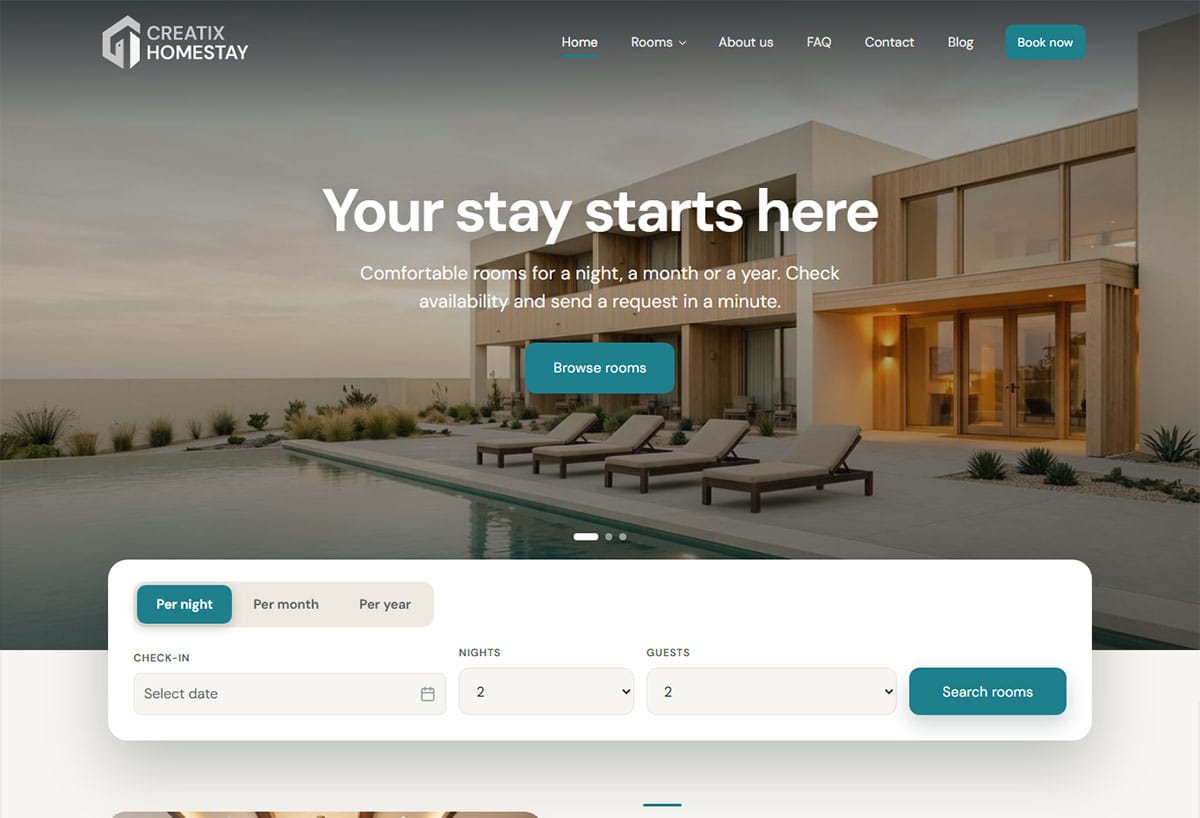
Looking for a WordPress hotel theme with booking function that works out of the box? Creatixbiz Stay handles rooms, availability, nightly, monthly and yearly pricing, coupons and checkout inside the theme itself. There is no separate booking plugin and no page builder to install. I’m the developer behind it, so below I walk through what it does well and where it falls short, so you can decide if it fits your hotel, guesthouse, villa or kost.
The Problem With Most WordPress Themes for Hotel Booking
Building a booking site on WordPress usually goes like this. You pick a pretty theme, add a booking plugin, then a second plugin for seasonal prices, a third for coupons, and a fourth to make the checkout look decent. Then a plugin update breaks the calendar on a Friday night.
That’s the itch Creatixbiz Stay tries to scratch. This WordPress hotel theme with booking function keeps rooms, availability, pricing, coupons, checkout and the booking calendar all inside the theme. No page builder, no booking plugin, no ACF. If you’re looking for a hotel booking WordPress theme that doesn’t force you into a stack of plugins, this is the main thing that sets it apart.
First Look: A WordPress Hotel Theme With Booking Built In
The admin is refreshingly simple. There are two top-level menus, Rooms and Stay, and that’s where you spend nearly all your time.
Rooms is your inventory: the rooms themselves, plus four taxonomies (Accommodation Types, Room Categories, Bed Types and Amenities). Stay is the control room: bookings, a calendar, manual bookings, eight tabs of general settings, twelve tabs of homepage settings, and a demo content tool.
The layout is easy to follow even with this many features. The README only scratches the surface, so don’t judge the theme by it.
Key Features of This WordPress Hotel Theme With Booking Function
The biggest advantage of this WordPress hotel theme is that the booking function is part of the theme, not an add-on. Availability, pricing rules and the booking calendar all live in one place, so a plugin update can’t break your reservations. It also keeps the site fast.
Everything lives inside the theme
Rooms, pricing rules, availability, coupons, booking form, and the full homepage are all handled by the theme itself. No booking plugin. No page builder. This is the biggest reason the official demo scores so well on performance tests.
Performance is excellent out of the box
I ran the live demo (cbstay.creatixbiz.com) through PageSpeed Insights on desktop (October 2026) and it scored:
- Performance: 100
- Accessibility: 97
- Best Practices: 100
- SEO: 100
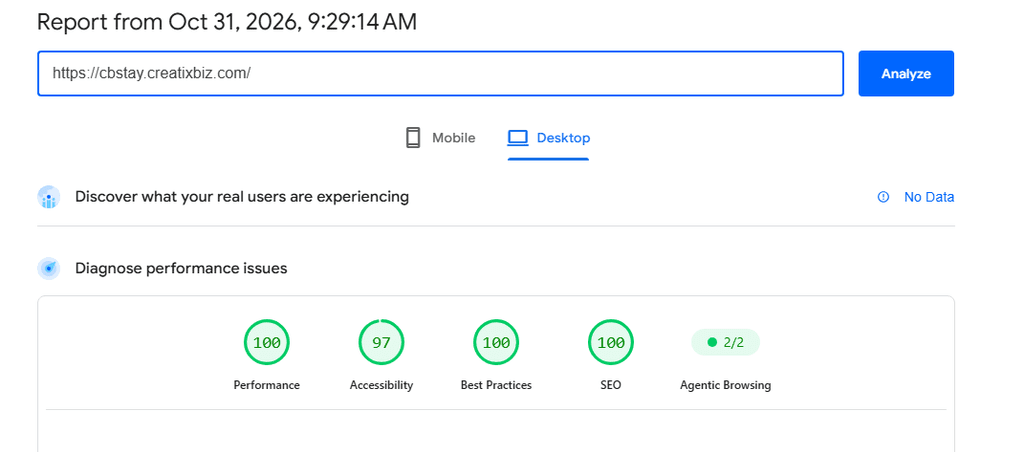
That’s rare for a full hotel booking WordPress theme. Most competitors become noticeably heavier once you add booking plugins and a page builder. Creatixbiz Stay stays fast because it doesn’t rely on those extra layers.
Monthly and yearly rentals are first-class
Every room can have a price per night, per month and per year. Leave a period empty and the room simply isn’t offered for it, and each period has its own minimum duration (say, 2 nights or 3 months). Most booking themes think only in nights, so this is a big deal if you run a kost, a long-stay guesthouse or a villa you rent out yearly.
Pricing covers real-life situations
You can add seasonal nightly prices by date range for high season and holidays. Extra guests can carry their own fee per night, month or year, with separate fees for adults and children if you switch on adults + children counting. Add-ons like breakfast or airport pickup can be charged once per booking, per guest, per day, per guest per day, per rental unit, or per guest per rental unit.
It tracks physical units, not just room types
A room is a room type, like “Deluxe Pool View”, and you enter how many identical units you own. The calendar then shows one row per unit, so you see exactly which room is free on which night. For phone and walk-in guests, Add Booking lets you set the unit to 0 and the theme assigns a free one automatically.
You control the homepage without a page builder
Twelve homepage tabs cover the hero slider, featured rooms, facilities, about, how booking works, gallery, guest reviews, location, FAQ and blog posts. Each section has its own on/off switch, and a Section Order tab lets you rearrange them. The FAQ section also outputs FAQPage structured data, so the questions are marked up in a format search engines can read.
The colours are yours to choose
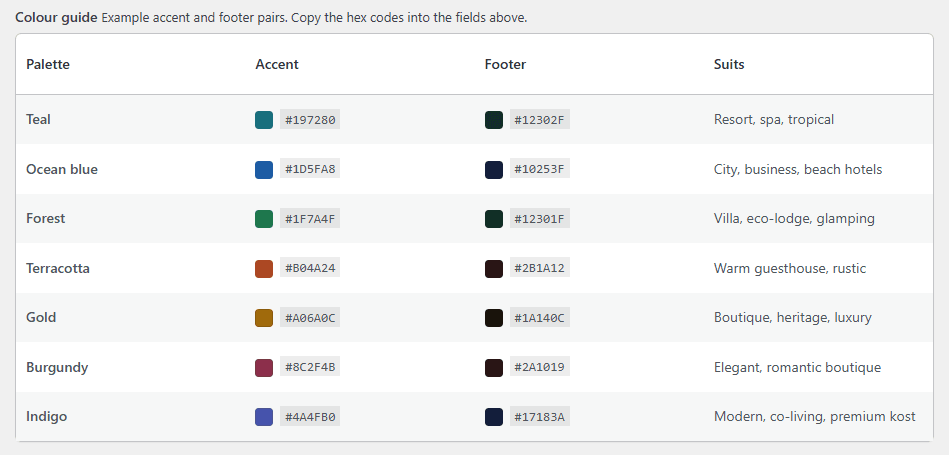
Under General Settings you pick an accent colour and a footer background colour. A built-in colour guide lists seven ready-made pairs. Homepage sections also have their own background and border colours, so you can create visual variety without writing CSS.
It protects you from double bookings
The theme locks each room while a booking is saved and checks availability again at that moment. The one-click demo content (with a clean remove button) lets you explore the whole system safely before entering real data.
Inside the Admin: Rooms, Bookings, Calendar and Settings
| Menu | What it does | My take |
|---|---|---|
| Rooms > All Rooms / Add Room | Room list shows prices per period, units and max guests. Full editor on one screen. | Fast and clear. No tab hunting. |
| Rooms > Accommodation Types | Hotel room, villa, homestay, kost, etc. | Clean way to mix property types. |
| Rooms > Room Categories | Deluxe, Family, Budget or custom. | Also works as homepage cards. |
| Rooms > Bed Types | King, twin, bunk, etc. | Guests can filter by it. |
| Rooms > Amenities | Wi-Fi, mini bar, balcony, etc. (add new ones easily). | Handy for both admin and filters. |
| Stay > Bookings | Filter by status, room, or guest details. Expand for full breakdown. | Clear and practical. |
| Stay > Calendar | Month view with one row per physical unit. | My favourite screen. |
| Stay > Add Booking | Manual bookings for phone, walk-in and WhatsApp guests. | Auto-assign unit is thoughtful. |
| Stay > General Settings | Eight tabs covering everything from currency to coupons. | Deep but well organised. |
| Stay > Homepage Settings | Twelve tabs for full homepage control. | The reason you don’t need a page builder. |
| Stay > Demo Content | Creates and cleanly removes sample data. | Excellent for learning the theme. |
The Guest Experience: Search, Room Pages and Checkout
Guests search by dates, rental period (night / month / year) and number of guests, then filter by category, accommodation type, bed type, amenities and price. The room page includes gallery, specs, amenities, custom “Good to know” fields, video, map, reviews and similar rooms. The booking form updates the price live. Checkout ends with bank transfer or booking request, plus an optional WhatsApp button. A fixed bottom bar offers Chat on WhatsApp and Call Us on mobile.
Limitations to Know Before You Buy
- No online payment gateway. Guests pay by bank or e-wallet transfer and confirm the payment manually, or send a booking request.
- No iCal sync or channel manager.
- Emails depend on your hosting (consider SMTP).
- Be careful with page caching on room pages because of the security nonce.
If your guests mostly pay via bank transfer or WhatsApp — common for kost, homestays and small villas — these limitations become much less important.
Is This Hotel Theme Right for Your Hotel, Villa or Guesthouse?
This WordPress hotel theme with booking function is a strong match for boutique hotels, guesthouses, villas, homestays and kost that accept bookings by bank or e-wallet transfer or WhatsApp. It is especially useful if you offer monthly or yearly rentals.
Freelancers and agencies building sites for these clients will also like the clean, plugin-free setup — particularly when working with property owners in Asia and other emerging markets.
Skip it if you need card payments at checkout, two-way sync with Airbnb or Booking.com, or a large multi-property platform.
If you want to list properties for sale or rent instead of booking rooms, see my WordPress theme for real estate agents.
How to Set Up Your Hotel Website in Minutes
Install and activate the theme, generate the demo content, fill in business details and rental periods under Stay > General Settings, set up your rooms, then delete the demo data and send yourself a test booking.
Frequently Asked Questions
Do I need a booking plugin with this theme?
No. Rooms, availability, pricing, coupons and checkout are built into the theme.
Can I rent rooms monthly or yearly, not just nightly?
Yes. Each room can have its own nightly, monthly and yearly price, with minimum durations.
Does it work without Elementor or another page builder?
Yes. The homepage is controlled from the theme settings, so no page builder is needed.
Does it support online payments?
Not yet. Guests can pay by manual bank or e-wallet transfer, or send a booking request. You confirm the payment yourself.
Verdict: A WordPress Hotel Theme With a Real Booking Function
If you want a WordPress hotel theme with a booking function that stays light and easy to maintain, Creatixbiz Stay is a solid choice, especially for small hotels, guesthouses, villas, homestays and kost that accept bookings by bank transfer or WhatsApp. If you need online card payments or two-way iCal sync, you will need to add those yourself.
The main trade-offs are the lack of online payment gateways and iCal sync. If you can live without those two features, it saves you the plugin juggling and gives you a complete booking system in one lightweight package.
Where can I see the demo and get the theme?
You can view the demo and get the theme here: Creatixbiz Stay – WordPress hotel theme with a booking function
1 thought on “WordPress Hotel Theme with Booking Function (Without a Plugin)”
Comments are closed.