
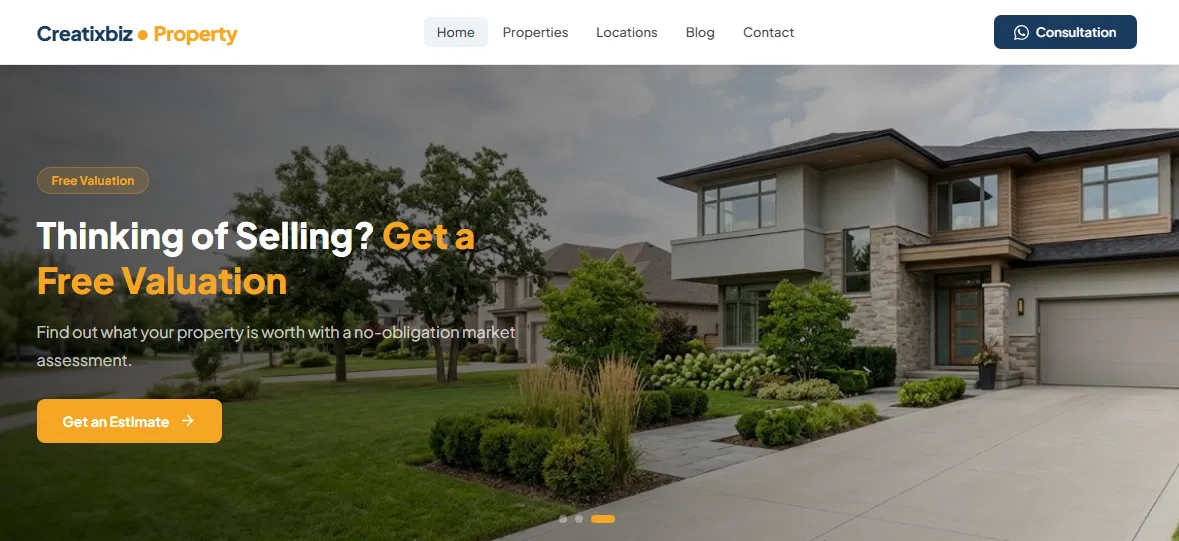
I’ve been working with WordPress for quite a while, and one thing I’ve noticed is that building a website for a real estate business is very different from building a regular company website.
A typical business website might only need a few pages, some company information, a contact form, and maybe a blog.
A property website has a different problem to solve. It needs to handle listings, property specifications, prices, locations, images, categories, and sometimes hundreds of properties. Visitors also need to be able to browse those properties quickly and find the ones that match what they’re looking for.
That made me wonder: what would a WordPress theme for real estate agents look like if it was designed specifically around the way real estate websites actually work?
So I decided to build one myself. I wanted to keep the setup relatively simple, while still providing the features that a property listing website needs. After spending quite a bit of time developing and testing it, I ended up with a lightweight, self-contained WordPress theme built specifically for real estate agents, property agencies, and property listing websites.
In this article, I’ll walk through what’s inside the theme, why I built some of the features the way I did, and what I learned while developing it.
Why a Real Estate Website Needs More Than a Generic WordPress Theme
There are plenty of good-looking WordPress themes available today. The problem is that a good-looking demo doesn’t always mean the theme is practical for managing real estate listings.
I’ve experienced this myself. A theme can look great when you first install it, but once you start adding real properties, things can become more complicated. You may need several additional plugins for listing fields, filters, maps, galleries, contact forms, or other features.
That isn’t necessarily a bad thing. WordPress is built around plugins, and sometimes using separate plugins is the right solution. But for a property website, I wanted to see how much of the basic functionality could be handled directly by the theme.
The reason is simple: properties contain a lot more structured information than a typical blog post.
A property might have a price, land area, building area, bedrooms, bathrooms, parking spaces, property type, location, and a collection of photos. Visitors may also want to browse properties by category or location.
Trying to manage all of that through a regular post editor can quickly become inconvenient. You can write all of the information into the content area, but structured property data gives you much more flexibility. Once the information is stored properly, it becomes possible to display it consistently on property cards, create filters, build archive pages, and organize listings more effectively.
That was one of the main ideas behind the theme I built.
What real estate agents actually need from a theme:
- A proper property post type with structured fields, not freeform text
- Filtering by type, status, and location that genuinely works
- Property detail pages that show specs at a glance
- A map, because “near the main road” is not an address
- Fast loading on mobile, because that’s where a large part of your audience will be
- WhatsApp contact that opens in one tap
- SEO-friendly structure so Google understands you sell houses, not opinions
The SEO angle nobody talks about
Everyone obsesses over keywords. “Houses for sale in [city].” Fine. Necessary. But here’s what actually separates property sites that rank from ones that don’t: structure.
When you have a dedicated property post type with real taxonomies, you can create clean archive pages for the things people actually search for:
- A page for Houses
- A page for Land
- A page for each district
Each one can become a useful landing page targeting a real search phrase, without you having to write a separate article for every category or location.
Compare that to shoving everything into one “Listings” page. One page, one shot at ranking, and it’s competing against every portal with a nine-figure marketing budget. Good luck.
Structured data matters too. Clean HTML, proper heading hierarchy, real image alt text, breadcrumbs that reflect actual hierarchy. Boring stuff. Boring stuff wins.
Of course, a good structure doesn’t guarantee rankings. Competition, content, links, indexing, site authority, and plenty of other factors still matter. But at least your theme isn’t making SEO harder than it needs to be.
And speed. A theme loading four CDN libraries and a page builder runtime is going to lose to a theme that ships plain CSS and a couple of small scripts. Google has been very clear about this, repeatedly, for years.
Don’t just take my word for it. The theme handles the technical SEO basics on its own, with no SEO plugin installed: meta descriptions, Open Graph and Twitter tags, breadcrumbs, and RealEstateListing structured data on every property page. It even marks filtered search URLs as noindex, so Google doesn’t waste time on a thousand near-duplicate pages. (If you already run Yoast, Rank Math, or a similar plugin, the theme steps aside automatically so nothing gets printed twice.)
I tested the demo site through Google PageSpeed Insights on mobile, with no SEO plugin active. The SEO score came back at a clean 100. Best Practices also hit 100, Accessibility landed at 92, and Performance at 99.
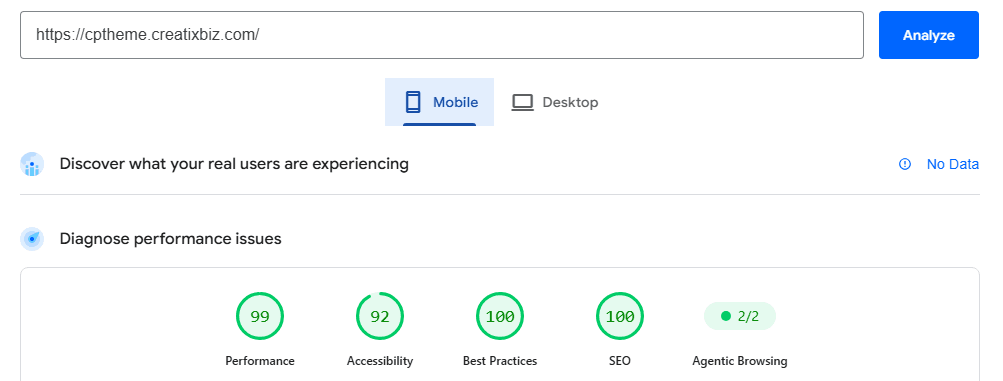
A fair warning about those performance numbers, though. They can vary depending on the test location, network conditions, server load, caching, and other factors. On my tests, the demo scored 99 on mobile and 100 on desktop in Google PageSpeed Insights, while GTmetrix gave it a Grade A with a performance score of 99%.
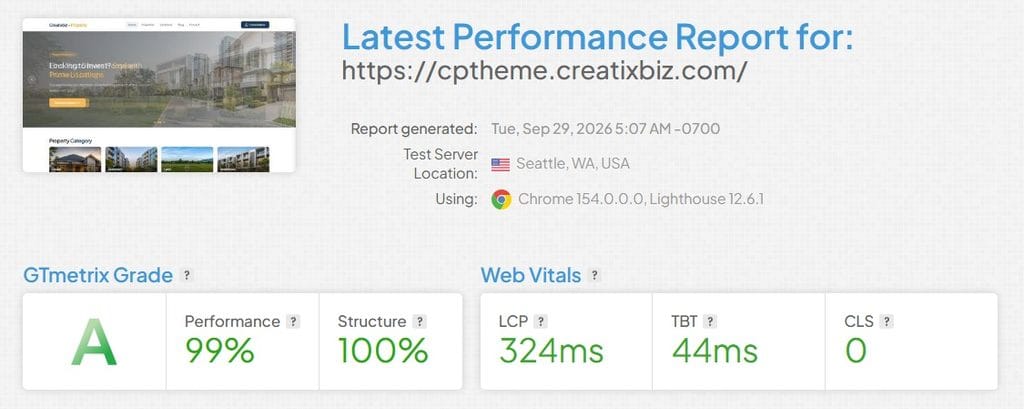
I wouldn’t treat those numbers as a fixed promise for every installation. What matters to me is keeping the theme itself lightweight and avoiding unnecessary dependencies that can slow a real estate website down.
And yes, a perfect score doesn’t guarantee page one. It just means your theme isn’t the thing standing in your way.
What’s Inside This Real Estate Agent WordPress Theme
I’ve spent enough years building WordPress themes and property sites for clients to lose count of how many times I assembled the same real estate site out of mismatched plugins. Eventually I got tired of it, so I built a theme that just does it.
The pitch is short: it’s self-contained. No Advanced Custom Fields. No form builder plugin. No page builder. You install the theme, activate it, and the Property menu shows up in your admin sidebar like it was always meant to be there.
Here’s what’s inside.
A real Property post type with real fields
Price, building area, land area, bedrooms, bathrooms, carport, number of floors, address. All structured fields with their own input boxes and their own units. Your agents fill in boxes. Nobody types “120 sqm land, 90 sqm building, 3 bed 2 bath” into a paragraph ever again.
There’s also a document uploader with file type and size validation built in, so you can attach certificates, floor plans, or cost estimates to a listing without wrestling a media library. And a YouTube URL field, for when the property genuinely deserves a video tour.
Three taxonomies that map to how people actually search
- Property Type — House, Land, Shophouse, whatever you sell
- Property Status — For Sale, For Rent, Ready to Build, Renovation
- Property Location — hierarchical, so you set up the regency first, then districts underneath it
That last one is the quiet hero. Hierarchical location means your archive pages nest properly, your breadcrumbs make sense, and you end up with a landing page for every district you operate in.
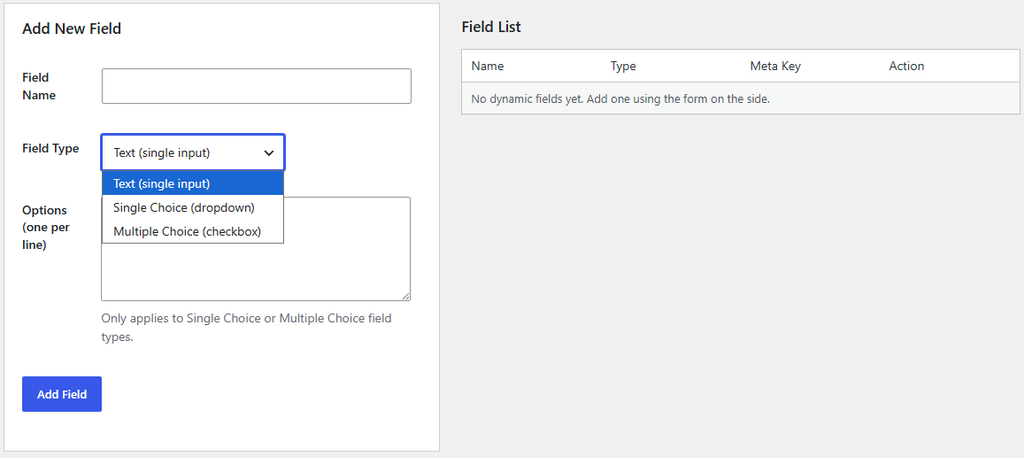
A Custom Field Builder (Because Every Market Is Different)
Real estate isn’t standardized across countries. The information an agent needs in one market can be completely different from what matters somewhere else. Maybe you need a property tenure field, an energy rating, parking type, facing direction, HOA information, or something specific to your local market.
That’s why the theme includes a custom field builder. From the WordPress dashboard, you can create additional fields for your properties without touching PHP or installing another custom-field plugin.
You can add a simple text field, a dropdown with predefined options, or a checkbox field for multiple selections. These fields are then available when creating or editing a property listing — and they’re tied specifically to the Property post type, so they don’t interfere with your regular blog posts or other content on the site.
Maps that don’t require a credit card
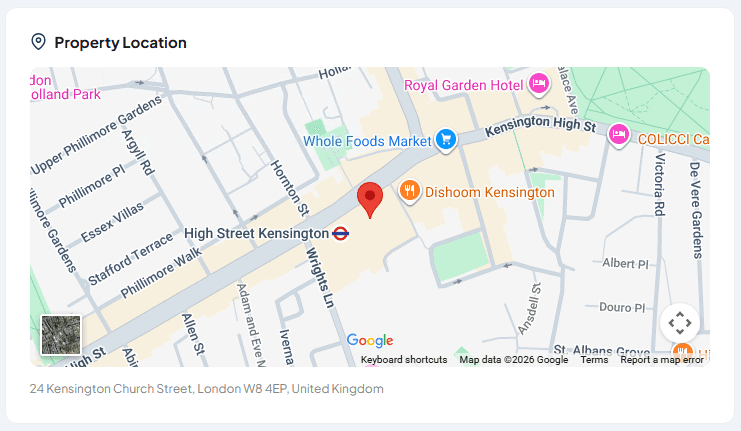
Every listing gets a map. In the admin, you pick the property’s location term — the district you already set up — and the map automatically zooms to that area. From there you just drag the pin to the exact spot. No hunting around a zoomed-out world map trying to find the right street.
Location picking and geocoding both run on Leaflet and OpenStreetMap — no Google Maps API key needed there. The property detail page itself uses a simple Google Maps embed link, the same kind you’d get from “share location” in your browser — no API key, no billing account, no surprise invoice because a bot crawled your listings page 40,000 times.
And it comes with a real advantage for visitors: on mobile, they can tap straight into the Google Maps app for turn-by-turn directions, or drop into Street View to walk the block before ever showing up in person.
A mortgage calculator, built in
There’s a mortgage calculator template included. It’s the kind of tool that quietly keeps people on your site for four extra minutes while they slowly realize what a 20-year loan actually means. Great for engagement. Mildly devastating personally. Both things can be true.
Filtering that actually works
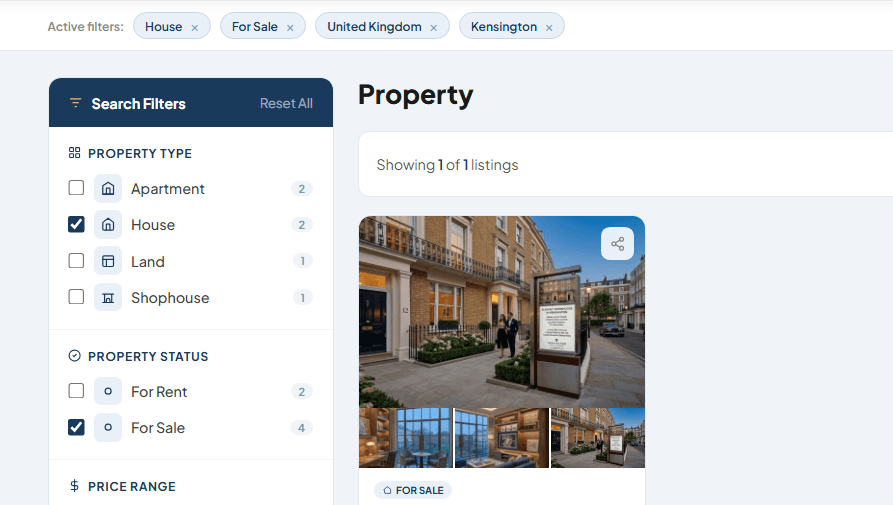
Filters run on real WP_Query parameters via GET, which means every filtered view has its own shareable URL. An agent can filter to “Houses, For Sale, in Downtown district,” copy the link, and drop it in a WhatsApp group. Try doing that with a fancy AJAX filter that never changes the address bar.
WhatsApp, front and center
There’s a general settings panel for your WhatsApp number, phone number, email, address, and social links. Contact buttons for WhatsApp and phone calls both wire up automatically — you can even hide the call button entirely if you only want WhatsApp — plus an optional fixed contact bar that follows mobile visitors down the page.
Because in this market, nobody is filling out a contact form and then patiently awaiting your reply within 2–3 business days.
The homepage you can actually control
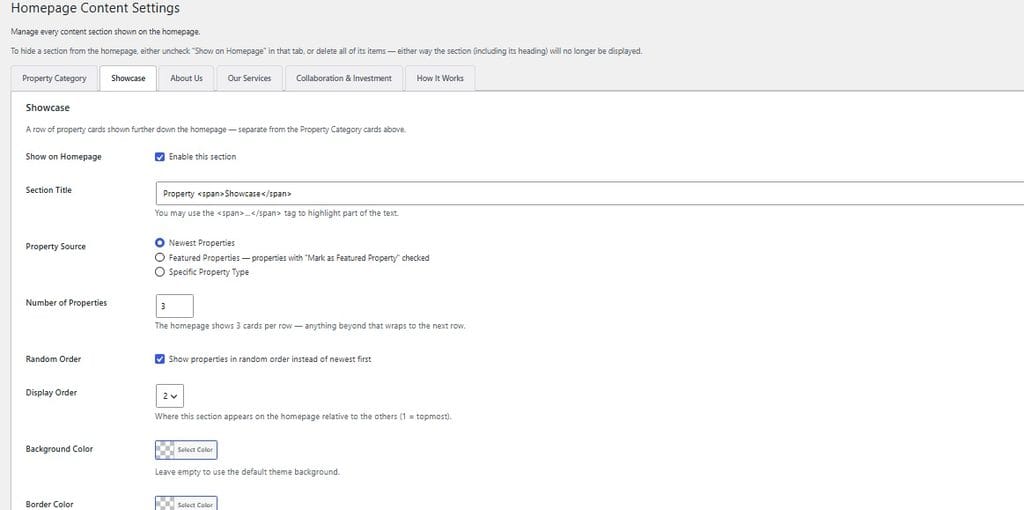
Hero slider settings and homepage content settings are both in the admin. No editing PHP, no hunting through a customizer with 400 nested panels, no “please don’t touch anything” note taped to your monitor.
Technical Details
Built for WordPress 6.0+ and PHP 7.4+, with plain CSS and no page builder bloat. Currency symbol and formatting are configurable from the settings panel, so pricing displays correctly whether you’re quoting Dollars, or anything else. The theme also ships with a translation-ready .pot file — copy it into a .po file for your language with a free plugin like Loco Translate (a step-by-step guide is included with your purchase), and every label in the theme switches over. Non-English markets are fully covered.
Fair and upfront: it’s version 1.0.5. Test it on staging before going live — which, honestly, is what you should do with any theme from anyone, including the ones with 20,000 sales and a five-star average.
Frequently Asked Questions
Does this theme need extra plugins to work?
No. The core property listing features (post type, fields, taxonomies, filters, maps, WhatsApp contact) work without requiring Advanced Custom Fields, a form builder, or a page builder.
Is it suitable for real estate agents in Indonesia or other local markets?
Yes. You can customize currency, create custom fields for local requirements, and translate the entire interface using the included translation file.
How does the performance compare to popular themes like Houzez?
The theme is intentionally lightweight (plain CSS, no page builder). On my tests the demo scored 99–100 on PageSpeed Insights. Real-world results will depend on your hosting and content, but the theme itself is not the bottleneck.
Can I use it for a multi-agent agency?
Yes. The structure supports multiple property listings and hierarchical locations. For very large multi-agent setups with complex membership systems, you may still want to evaluate more feature-heavy options.
Where can I see the demo and get the theme?
You can view the demo and purchase the theme here: See the demo and get the theme →
So, do you want it?
If you’re a real estate agent, a small agency, a property developer, or a web developer who keeps getting asked to build property sites and is tired of gluing plugins together — this theme was built for exactly that.
See the demo and get the theme →
Have questions about your market, your listing volume, or need something customized first? Reply to this post or reach out — happy to give a straight answer, including “this isn’t a fit for you” if that’s the honest one.
1 thought on “I Built a WordPress Theme for Real Estate Agents — Here’s What’s Inside”
Comments are closed.